
Frequently asked questions
Answers to common questions about Bookil.
About Bookil
What is Bookil?
Bookil is a PDF reader for iPhone and iPad. It stores reading state (current page, progress, bookmarks, annotations) separately from the PDF file, so deleting a PDF doesn’t lose your history.
What does Bookil cost?
Bookil is free.
Which devices does Bookil run on?
Bookil runs on iPhone and iPad with iOS 18.4 or later.
What languages is Bookil available in?
The app is localized in 14 languages: German, English, Spanish, French, Hindi, Indonesian, Italian, Japanese, Korean, Brazilian Portuguese, Russian, Vietnamese, Simplified Chinese, and Traditional Chinese. This documentation site is English and Japanese.
Importing PDFs
How do I add a PDF to Bookil?
Three ways. From another app, use the iOS share sheet. From inside Bookil, tap Add PDF in the sidebar. Or copy PDFs directly into Bookil’s folder using the Files app. See Read your first PDF.
A PDF won’t open. Why?
A few reasons:
- The PDF has interactive form fields. Bookil can’t open these. Use another app to fill out the form.
- The PDF is corrupted. Try a different copy.
- The PDF is password-protected. Bookil asks for the password when you open it. If you don’t know the password, you can’t read the PDF.
Bookil says “A book with the same name already exists.”
Two different PDFs with the same file name can’t coexist in Bookil’s library. Rename one in its source app, or delete the existing copy first (long-press → Remove from Device in Bookil, or remove it from the Files app).
Can I import PDFs that are password-protected?
Yes. Bookil imports them but can’t generate a thumbnail until you unlock them. When you open the PDF, Bookil asks for the password.
Reading
Why can’t I select text or copy it?
Bookil’s reader doesn’t have text selection in this release. PDFs are rendered as images so that color themes and contrast adjustments stay consistent across the page. If you need to copy text, open the PDF in another app.
Why doesn’t search work inside a PDF?
In-document search isn’t supported in this release.
Why can’t I zoom in Double layout?
You can. Pinch to zoom works in both Single and Double layouts, up to 4×.
Why does Bookil mark a book as Read on its own?
When you reach the last page, Bookil sets the book to Read. You can change the state any time with the long-press menu (Mark as Read / Mark as Unread).
Where do bookmarks go when I delete a PDF?
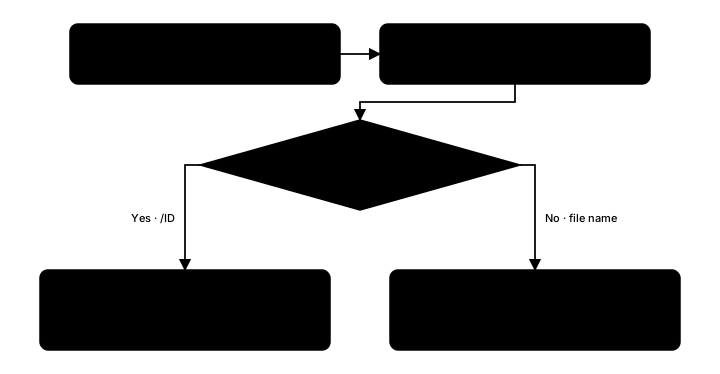
Bookmarks live with the reading history, not the PDF file. Removing a PDF from your device keeps the bookmarks. Re-importing the same PDF reattaches them automatically, as long as the PDF’s internal identifier matches.
Collections
Can a PDF be in more than one collection?
Yes. A PDF can belong to as many collections as you like.
Can I reorder collections?
Yes. When you have more than one collection, tap the reorder button (the up-and-down arrows) in the Collections sidebar header and drag the handles to arrange them.
What is the Unfiled view?
Books that don’t belong to any collection. It’s separate from All Books — All Books shows everything (except books in a locked private collection), Unfiled shows only the loose books.
Can I have two collections with the same name?
Yes. Bookil doesn’t require unique names.
Why doesn’t the sidebar show counts?
Counts in the sidebar are intentionally left out. The number isn’t useful enough to be worth the clutter.
Private collections
Are the PDF files in my private collection protected?
Bookil’s lock hides books from the library view. Bookil does not modify the PDF files themselves. The lock follows the same design as the Hidden album in Apple Photos.
What can someone with physical access to my unlocked phone see?
If you’ve unlocked a private collection in this session and your phone is unlocked, that person can see your books. Sending Bookil to the background re-locks all private collections.
What if I don’t have a device passcode?
Private collections require a device passcode. Without one, you can’t lock or unlock a collection.
Does the lock state sync to my other devices?
iCloud sync is planned but not yet shipping. For now, lock state is per-device.
What happens to private collections in an export?
The exported file holds them, including which books are in them, all in plain JSON. The isLocked: true flag is preserved, but the contents are readable. Keep your backup files somewhere safe. See Back up your library.
Backup and sync
How do I back up my library?
In Settings → Export reading history. Bookil writes Bookil Library.json and opens the share sheet. See Back up your library.
Can I restore from a backup?
Yes, but the import action lives in the developer settings. Tap the version number in Settings seven times to reveal it, then use Import reading history. Older backups (from Bookil 2025.08.1 or earlier) can’t be imported.
Does Bookil sync to my other devices?
iCloud sync is planned. Until it ships, each device keeps its own reading history.
Why does my history survive when I delete the PDF?
Bookil identifies each PDF by its internal fingerprint, not just its file name. When you re-import the same PDF, Bookil matches it against the existing history and reconnects automatically.
Settings
What does “Keep screen on” do?
When on, Bookil prevents the screen from auto-locking while you’re reading. Default is on.
Why are there two binding-direction settings?
The one in Settings → Default binding is your global preference. The one in the reader’s Aa sheet is the override for the current book. Most users only need the global one.
Where do I report a bug?
Use the form on the Support page.